No power & restart faults
Start with the symptom.
A TV that will not start or repeatedly restarts may have a supply, power-board, mainboard or other fault. Inspection is needed before recommending a board replacement.
 NelloreRepairs.CALL 94625 81511 ↗
Bring back the picture.
Start with a conversation.
From a dark screen to missing sound, tell us what changed. Call to check TV service for your address in Udayagiri.
Out-of-warranty products only · Visits from ₹500
Share your full address in Udayagiri, PIN code and a nearby landmark. This destination may require a longer travel route from Nellore. Confirm coverage, travel charges and an appointment before booking.
Tell us whether the TV is wall-mounted or on a stand, its screen size and any access restrictions. Do not remove a large TV from its bracket alone or place pressure on the screen to prepare for a visit.
Some faults require workshop testing or compatible parts. Agree any collection, handling and transport arrangements before the TV is moved. This page does not claim a walk-in branch in Udayagiri.
Start with the symptoms. Inspection helps separate a source or settings problem from a hardware fault.
Start with the symptom.
A TV that will not start or repeatedly restarts may have a supply, power-board, mainboard or other fault. Inspection is needed before recommending a board replacement.
A dark screen has several possible causes.
On an LED-backlit LCD TV, the backlight, power supply, display circuitry or panel may need assessment. OLED displays use different technology and do not use the same backlight repair approach.
Understand the screen repair options.
Lines, flicker, patches or physical damage require model-specific inspection. A cracked display may need a replacement panel; availability and cost can make replacement of the whole TV worth comparing.
Follow the signal before replacing parts.
No sound, distorted audio or an HDMI problem can involve settings, the source device, a cable or internal electronics. Describe whether the issue occurs on all inputs and built-in apps.
Separate app trouble from hardware trouble.
Network, app and startup issues can have different causes. Use only model-approved software. Discuss settings and account effects before a reset, and never share streaming passwords or OTPs with a technician.
Plan safe access from the start.
Share screen size, model, mounting arrangement and wall type. Confirm bracket compatibility, wall condition, access and any additional hardware or removal charges before booking.
LED-backlit LCD: A backlight illuminates an LCD panel. A dark image can have more than one cause and needs testing.
QLED & Mini LED: These labels commonly describe LCD-based display features; the exact model still determines its components and repair options.
OLED: It uses self-emitting pixels, not the same backlight assembly as an LED/LCD television. Confirm specialist model support first.
Smart TV: This describes connected features, not a particular panel technology. App, network and hardware problems require different checks.
Display technology reference: Samsung’s LED, OLED and QLED guide. Check your exact model before booking.
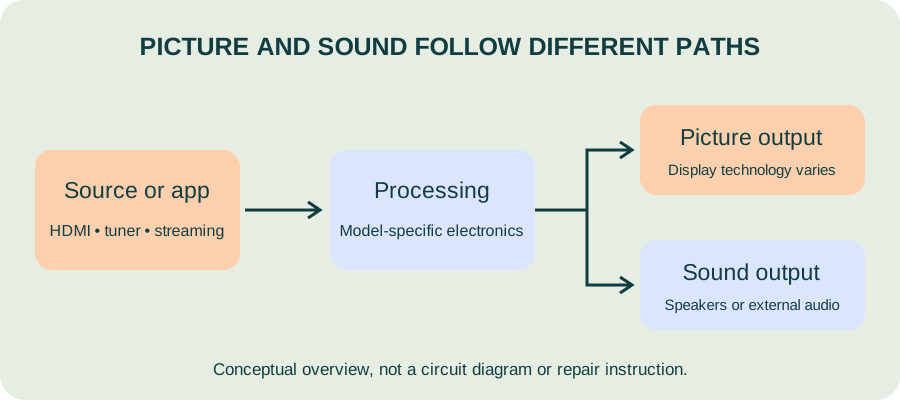
Safe first step: Check the remote batteries and whether the standby indicator is visible. Check an accessible power connection only if it is dry and undamaged; do not repeatedly reset a tripping breaker.
Inspection may cover: The supply path, power board, mainboard and other components may require tests.
Safe first step: Check the selected input and whether the on-screen menu appears. Note whether the fault affects built-in apps and external sources alike. Do not press on the panel.
Inspection may cover: Backlight-related components on LED/LCD models, display circuitry or the panel may need assessment.
Safe first step: Check mute, volume and selected audio output. Test another source if convenient; a connected soundbar or receiver can change the audio path.
Inspection may cover: Source, cable, speaker, audio circuitry or mainboard faults may be involved.
Safe first step: Note whether lines appear in the TV menu and whether app trouble affects one app or everything. Do not install unofficial firmware or perform a reset without understanding its effect on accounts and settings.
Inspection may cover: Display faults need model-specific diagnosis; app and network issues may have a different cause.
This is a starting visit fee, not a fixed total repair price. Confirm travel charges, taxes, cancellation terms and whether the visit fee is adjusted against repair costs.
Discuss payment by cash or UPI.
Share the full model, screen size, symptoms and service address.
Agree coverage, timing, safe access and the applicable visit fee.
Discuss diagnosis, parts, labour and any workshop or transport requirements.
Discuss picture, audio and input checks relevant to the completed repair.
Call 9462581511 or 7852836173 with your full address in Udayagiri, PIN code, nearest landmark and TV details. Confirm that your address is covered and agree the visit charge before booking.
This page describes service enquiries for Udayagiri; it does not claim a branch or walk-in office there. Confirm doorstep availability by phone.
TV visiting charges start at ₹500. Confirm the applicable visit fee, travel charges and taxes before booking. Parts and repair labour are quoted separately after inspection.
No. Nellore Repairs is an independent, private service provider for out-of-warranty products. Brand names identify customer equipment and do not imply manufacturer authorisation, affiliation or endorsement.
The published service hours are 8:00 AM to 8:00 PM. Call 9462581511 or 7852836173 to discuss availability and arrange a visit.
Some inspections and repairs may be possible on site. Panel work, specialist testing or parts replacement may need workshop facilities. Agree any transport, handling and workshop charges before the TV is moved.
Physical panel damage may require a compatible replacement panel rather than a simple board repair. Ask for an estimate and compare it with the cost and warranty of a suitable replacement TV.
Call to discuss your TV, address and available appointment.
8:00 AM–8:00 PM · Cash or UPI
Visits from ₹500. Confirm your local fee.